
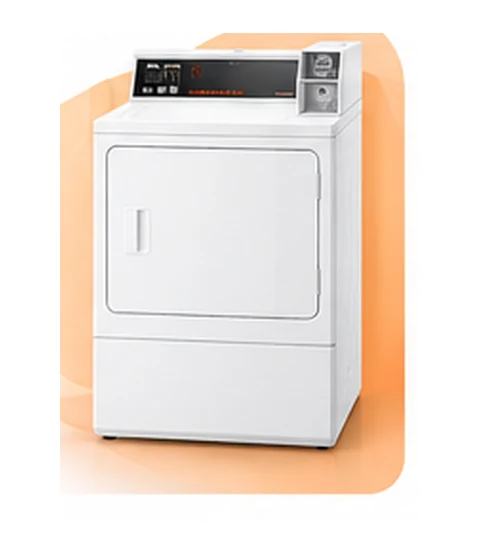
Speed Queen Dryer Heating Repairs
On compatible electric dryers, a heating element or protection circuit may require work. Gas-equipped machines need an ignition and heat-cycle diagnosis instead.
Online booking opens in a new tab.

Easily book and customize your appointment details online.

Select the day and time for your service, even as early as same-day.

Your tech arrives on time bringing the tools, expertise and know-how for the job.
E-genius Appliance Repair reviews Speed Queen dryer service requests in Charlotte, NC for no heat, no start and mechanical problems. Tell us the full model and whether the unit is a residential dryer or uses commercial payment controls. Request an appointment online or call (980) 443-5851.
We're only a few clicks or a phone call away.
No risk. No pressure.
Guaranteed parts and service.
Expert technicians.
Choose the Speed Queen dryer symptom that matches your machine. Residential controls and commercial payment systems use different references; identifying the equipment is as important as describing the problem.
The symptom list covers model-dependent scenarios. Commercial equipment requires a separate service-scope check. The commercial code reference is not a claim that every payment, network or industrial system is serviced.
Dark panel or no response to Power
The drum turns, but the load receives no heat
Controls respond, but the cycle never begins
Laundry stays damp after a completed cycle
Unexpected stopping during a cycle
High-pitched sound during drum rotation
The dryer responds, but the drum stays still
Loads need unusually long or repeated cycles
Use this entry when the dryer does not respond at all, rather than when the controls work but the cycle will not start. Note any recent outage or electrical work. Supply and appliance faults require different checks.
Related Speed Queen repair optionsThe controls respond, but pressing Start does not begin tumbling. Check normal door closure and any control-lock setting in the model instructions. A persistent failure needs assessment of the start controls, door sensing and drive; never bypass a door switch.
Related Speed Queen repair optionsA stationary drum with working controls is different from a complete loss of power. Tell us whether the motor hums or there is another unusual sound. The drive and controls need inspection before a belt or motor can be identified as faulty.
Related Speed Queen repair optionsA hum without normal drum movement can involve the load, drive or motor. Stop repeated start attempts and describe the sound with your model number so the correct system can be assessed.
Related Speed Queen repair optionsNote whether the entire dryer loses power or the cycle ends while the panel stays on. These are different situations. Door signals, heat protection, sensing and supply conditions need to be distinguished rather than treated as one failed part.
Related Speed Queen repair optionsCompare the selected cycle with the condition and size of the load. An early sensor-cycle finish is not necessarily the same as a loss of power. Explain whether the controls stay on and whether the laundry is still damp.
Related Speed Queen repair optionsFirst check whether a wrinkle-prevention function explains periodic tumbling after the main cycle. Continuous operation that does not match the selected settings needs a timer or control assessment.
Related Speed Queen repair optionsDo not repeatedly reset a breaker that trips when the dryer operates. Supply, wiring and appliance faults require qualified assessment; increasing the breaker rating or bypassing protection is not a repair.
Related Speed Queen repair optionsCheck that a heated cycle was selected, then describe whether the dryer stays cold or loses heat after starting. The heating system, supply and controls need to be assessed together; a no-heat symptom does not prove that the heating element has failed.
Related Speed Queen repair optionsA load that stays damp can involve load size, cycle selection, airflow or heat. Note whether the dryer warms up and whether the cycle finishes normally. This helps separate poor drying from a complete loss of heat.
Related Speed Queen repair optionsCompare similar loads and record the cycle selected. Routine filter care, the drying route and heating performance all matter. Longer cycles alone are not a confirmed sensor or heater failure.
Related Speed Queen repair optionsMixed fabrics and bulky loads can dry at different rates. Use the model instructions for load and cycle choices; if similar loads repeatedly dry unevenly, describe the pattern when requesting assessment.
Related Speed Queen repair optionsStop using a dryer that seems excessively hot or repeatedly trips its thermal protection. Airflow, operating conditions and heating controls need assessment. Do not bypass a thermal fuse or thermostat.
Related Speed Queen repair optionsCheck what cooling behavior is specified for the selected program. If excessive heat persists or the machine does not follow its normal cycle, stop use and describe the sequence for a temperature-control assessment.
Related Speed Queen repair optionsThis entry applies to dryers with the relevant sensing display or function. Load contact and selected settings may affect sensing, so describe the load and whether timed drying behaves differently before assuming a sensor is faulty.
Applies to: Only models fitted with the relevant display, sensor or indicator.Related Speed Queen repair optionsIdentify whether the dryer has a mechanical timer or an electronic time estimate. Some sensed cycles adjust their time during operation; persistent running with no progress needs a model-specific assessment.
Related Speed Queen repair optionsA moisture-sensing program may revise the remaining time as it measures the load. If similar loads suddenly need much longer, describe changes in heat, airflow or load conditions instead of assuming the display itself is broken.
Related Speed Queen repair optionsDescribe whether the noise is scraping, rumbling, rattling or rhythmic. Load objects, installation and rotating components can sound different. Stop use if the noise is severe or accompanied by smoke or abnormal heat.
Related Speed Queen repair optionsCheck for loose items in the load and visible contact between the cabinet and nearby objects. If rattling continues with normal loading, the source needs assessment rather than a guessed roller replacement.
Related Speed Queen repair optionsA crackling sound should be distinguished from fabric or fastener noise. If it is accompanied by sparks, burning odor or electrical symptoms, stop use and seek qualified help rather than running another test cycle.
Related Speed Queen repair optionsA repeat squeak or squeal during rotation can involve a support, bearing or tensioning component. Tell us when it happens and whether the load changes it. The actual drive layout determines which parts need inspection.
Related Speed Queen repair optionsStop use if grinding or scraping is persistent. An object, worn support or drum contact may need inspection; continuing to run the dryer can make it harder to assess and prevent further damage.
Related Speed Queen repair optionsA bulky load and a mechanical drum-support problem can both cause thumping. Note whether the sound changes with normal loading and whether the dryer is stable. Persistent knocks need assessment.
Related Speed Queen repair optionsSome switching sounds are normal, but clicking with failed starting or lost heat needs context. Record when the sound occurs and whether the drum and controls respond. Do not use the sound alone to select a relay or board.
Related Speed Queen repair optionsCheck visible stability and load balance without moving heavy equipment unsafely. Persistent vibration can involve installation or rotating components; tell us whether the machine has recently been moved or stacked.
Related Speed Queen repair optionsFor a display-equipped dryer, describe whether the screen alone is dark or the entire machine is unresponsive. Note any sounds or other indicators. This distinction helps separate display, supply and control concerns.
Applies to: Only models fitted with the relevant display, sensor or indicator.Related Speed Queen repair optionsCheck the control-lock setting and normal start procedure in the model manual. If only some keys fail, record which ones. Do not press damaged controls repeatedly or assume a new board is required.
Related Speed Queen repair optionsRecord when the beeping occurs and whether a message or light appears with it. A cycle-end signal, lock setting and fault alert do not mean the same thing; the model instructions help identify the difference.
Related Speed Queen repair optionsRecord the exact letters, numbers and sequence before clearing a message. Use the separate code reference below and match its model notes. The display alone does not establish which part has failed.
Applies to: Only models fitted with the relevant display, sensor or indicator.See Speed Queen codes and messagesCheck whether a delayed start or wrinkle-care option explains the behavior. If the dryer starts when it should not, stop using it and request a control assessment instead of relying on repeated resets.
Related Speed Queen repair optionsStop using the dryer. A door-safety problem requires qualified assessment; do not hold, bridge or bypass a switch to continue operation.
Related Speed Queen repair optionsCheck for laundry caught in the opening without forcing the door. A misaligned latch, seal or hinge needs the correct model-specific assessment rather than repeated attempts to slam it shut.
Related Speed Queen repair optionsDo not force the handle or lock. Follow the model instructions and allow any required cycle or safety delay. Explain whether the appliance is a standalone dryer or a combination unit.
Related Speed Queen repair optionsThis applies only to models with an interior lamp. Check the expected light behavior in the manual and whether other functions work. The light unit, door sensing and controls may require different checks.
Applies to: Only US models with an interior lamp.Related Speed Queen repair optionsSome filter indicators are routine reminders rather than a measured blockage. Follow the exact model instructions for cleaning, fitting and clearing the indication; do not assume the warning means a sensor has failed.
Applies to: Only models fitted with the relevant display, sensor or indicator.Related Speed Queen repair optionsFor a vented dryer, a restricted route can affect heat and drying. Check routine filter care and visible installation conditions safely. Hidden ductwork or persistent restriction may need a qualified vent specialist.
Applies to: Vented models only.Related Speed Queen repair optionsThis concerns vented installations, not a condensate tank. Duct routing, ambient conditions and airflow may contribute to condensation; the source needs assessment before an appliance water component is blamed.
Applies to: Vented models only; duct routing, ambient temperature and airflow.Related Speed Queen repair optionsRead the exact warning and use the model-specific instructions. Clearing the display does not remove an actual restriction. Persistent warnings call for checking the appliance and the exhaust route.
Applies to: Only display-equipped vented models with that warning.Related Speed Queen repair optionsIdentify when the water appears without touching wet electrical parts. A steam hose, condensate system, vent condensation or a nearby appliance can be involved, depending on the installation. A conventional non-steam vented dryer normally has no water supply.
Related Speed Queen repair optionsTell us whether the appliance has steam or combination-washing functions and when the moisture appears. Condensation and a water-system fault need different checks; do not assume a standalone dryer has a wash-water valve.
Related Speed Queen repair optionsUse this entry only for a model with the documented steam feature. Confirm the selected steam program and approved water-supply arrangement in the manual. A steam problem is not the same as loss of normal drying heat.
Applies to: Only a model with a documented steam function.Related Speed Queen repair optionsFor water-fed steam models, stop use if water reaches electrical equipment. Identify the visible source without handling live or wet connections. A hose, connection and valve require different checks.
Applies to: Only model with water-fed steam feature; hose/valve/connection.Related Speed Queen repair optionsStop using the appliance and leave the area if there is active smoke or fire. Call 911 from a safe location. Do not open the cabinet, unplug equipment in a dangerous area or wait for an online appointment.
Read the urgent safety guidanceStop using the dryer until the source is assessed. A load, lint or an electrical problem may be involved; do not keep running it to see whether the smell clears. Active smoke or fire requires emergency help.
Read the urgent safety guidanceKeep clear and stop using the appliance. Do not touch damaged cords, plugs or wet electrical equipment. Have the supply and appliance checked by a qualified professional; seek emergency help for smoke or fire.
Read the urgent safety guidanceKeep people away and stop use. Do not touch the appliance again to confirm the symptom. Electrical supply and appliance safety must be assessed before further operation.
Read the urgent safety guidanceDamp loads, residues and drying conditions can contribute to a musty smell. Follow the model cleaning instructions and note whether clothes remain damp after a full cycle. Persistent odor may need inspection.
Related Speed Queen repair optionsDescribe the odor and when it occurs. Residue and installation odors differ from burning or gas smells. Stop use for a burning smell; suspected gas leakage requires leaving the area and contacting emergency services or the gas utility.
Read the urgent safety guidanceLeave the area immediately. From a safe location, contact your gas utility or 911. Do not operate switches, plugs, phones or anything that could spark in the affected area, and do not try to find the leak yourself.
Applies to: Gas models only. Follow emergency guidance if you suspect a leak.Read the urgent safety guidanceCheck normal lint-filter care and load separation in the manual. A damaged filter, load conditions or restricted air circulation may need different attention. Note whether drying performance has changed as well.
Related Speed Queen repair optionsStop drying delicate or affected items until the cause is understood. Note the type of damage and check for visible objects without dismantling the drum. Gaps, seals and load-related damage need different assessments.
Related Speed Queen repair optionsRecord where the marks appear on the fabrics and whether there is scraping or a burning smell. Residue, seals and mechanical contact are different possibilities; avoid assuming a particular drum part is at fault.
Related Speed Queen repair optionsStop using the dryer. Scorching requires an assessment of the load conditions, heat control and airflow. Do not continue with a lower setting as a substitute for checking abnormal heat.
Read the urgent safety guidanceCompare garment-care labels with the selected cycle and temperature. Fabric sensitivity and overdrying differ from a temperature fault; request assessment if the dryer is hotter than expected or controls do not respond.
Related Speed Queen repair optionsLoad size, fabric mix and time left in the drum can affect wrinkling. Check the recommended settings and wrinkle-care options before treating wrinkles alone as an appliance failure.
Related Speed Queen repair optionsVery dry loads and mixed fabrics can increase static. Review dryness settings and fabric-care instructions. If the dryer consistently overdrys despite appropriate settings, explain the pattern when requesting service.
Related Speed Queen repair optionsFor gas models only, note whether the drum runs and heat never begins or stops later. The ignition and safety system needs qualified diagnosis. A gas smell is a separate emergency and should not be tested by restarting the machine.
Applies to: Gas models only; gas supply/ignition system.Related Speed Queen repair optionsDescribe whether heat returns later and whether the cycle continues. Ignition, sensing, supply and safety circuits need model-specific assessment; do not open the gas system or bypass a control.
Applies to: Gas models only; service diagnosis needed.Related Speed Queen repair optionsDescriptions cover possible service scenarios, not confirmed component failures. Follow the owner instructions for your exact model and leave internal electrical, gas and refrigeration work to qualified professionals.
Speed Queen repair work depends on whether the machine is residential or commercial and on its drive, heat and controls. Confirm the equipment type before arranging a model-specific assessment.
On compatible electric dryers, a heating element or protection circuit may require work. Gas-equipped machines need an ignition and heat-cycle diagnosis instead.
We review the belt and drive layout when a Speed Queen dryer will not turn. A replacement belt is chosen for the full model, with related components checked as needed.
Persistent noise or motor protection calls for assessment of the rotating parts and load conditions. Bearing, support and motor work is model-dependent.
A mechanical timer complaint and an electronic display fault involve different checks. We identify the Speed Queen controller before recommending a timer, switch or board.
Door operation and thermal protection are assessed when the dryer will not run or stops repeatedly. Safety devices are never treated as items to bypass.
For coin-operated or other commercial units, provide the full model and control details first. Appliance repair, payment hardware and network programming are separate scopes of work.
Send the full Speed Queen model and specify residential or commercial use. We will confirm whether the requested appliance and control work is within service scope. Repairs depend on diagnosis, model compatibility and parts availability.
Request Speed Queen Dryer ServiceChoose the correct control family. Residential messages come from guide D518541; commercial electronic entries come from D516167. A Favorites number or idle indicator on one control is not the fault with a similar display on another.
Applies to: Residential D518541 / commercial D516167: select the correct family. Faults, warnings, diagnostic entries and normal status messages are labeled separately. No service-mode entry or internal repair instructions are provided.
Also shown as: Er, ro (alternating)
What to do: Stop repeated start attempts if the drum does not turn normally. Describe any humming or mechanical noise and arrange a model-specific assessment of the drive and its controls.
Applies to: Residential electronic control D518541
Manufacturer referenceWhat to do: This is a saved program selection on the documented residential control, not an F-code fault. Consult the model instructions for selecting or changing Favorites.
Applies to: Residential electronic control D518541
Manufacturer referenceWhat to do: Follow the control-lock instructions for your exact model. A lock setting is not itself a repair fault; request help only if the controls remain unresponsive after the correct procedure.
Applies to: Residential electronic control D518541
Manufacturer referenceWhat to do: On this documented residential control the idle blink is a status indication. Do not use a commercial network-fault definition for the same-looking indicator.
Documented residential idle blink differs from the commercial solid network-error decimal.
Applies to: Residential electronic control D518541
Manufacturer referenceWhat to do: Record the full model and exact message, then request diagnosis of the relevant control or circuit. Do not change wiring, board settings or safety devices based only on the code.
Applies to: Commercial electronic control D516167
Manufacturer referenceWhat to do: Record the full model and exact message, then request diagnosis of the relevant control or circuit. Do not change wiring, board settings or safety devices based only on the code.
Applies to: Commercial electronic control D516167
Manufacturer referenceWhat to do: Record the full model and exact message, then request diagnosis of the relevant control or circuit. Do not change wiring, board settings or safety devices based only on the code.
Applies to: Commercial electronic control D516167
Manufacturer referenceWhat to do: Record the full model and exact message, then request diagnosis of the relevant control or circuit. Do not change wiring, board settings or safety devices based only on the code.
Applies to: Commercial electronic control D516167
Manufacturer referenceWhat to do: Record the full model and exact message, then request diagnosis of the relevant control or circuit. Do not change wiring, board settings or safety devices based only on the code.
Applies to: Commercial electronic control D516167
Manufacturer referenceWhat to do: Record the full model and exact message, then request diagnosis of the relevant control or circuit. Do not change wiring, board settings or safety devices based only on the code.
Applies to: Commercial electronic control D516167
Manufacturer referenceWhat to do: Record the full model and exact message, then request diagnosis of the relevant control or circuit. Do not change wiring, board settings or safety devices based only on the code.
Applies to: Commercial electronic control D516167
Manufacturer referenceWhat to do: Record the full model and exact message, then request diagnosis of the relevant control or circuit. Do not change wiring, board settings or safety devices based only on the code.
Applies to: Commercial electronic control D516167
Manufacturer referenceWhat to do: Record the full model and exact message, then request diagnosis of the relevant control or circuit. Do not change wiring, board settings or safety devices based only on the code.
Applies to: Commercial electronic control D516167
Manufacturer referenceWhat to do: Record the full model and exact message, then request diagnosis of the relevant control or circuit. Do not change wiring, board settings or safety devices based only on the code.
Applies to: Commercial electronic control D516167
Manufacturer referenceWhat to do: Record the full model and exact message, then request diagnosis of the relevant control or circuit. Do not change wiring, board settings or safety devices based only on the code.
Applies to: Commercial electronic control D516167
Manufacturer referenceWhat to do: Record the full model and exact message, then request diagnosis of the relevant control or circuit. Do not change wiring, board settings or safety devices based only on the code.
Applies to: Commercial electronic control D516167
Manufacturer referenceWhat to do: Record the full model and exact message, then request diagnosis of the relevant control or circuit. Do not change wiring, board settings or safety devices based only on the code.
Applies to: Commercial electronic control D516167
Manufacturer referenceWhat to do: Record the full model and exact message, then request diagnosis of the relevant control or circuit. Do not change wiring, board settings or safety devices based only on the code.
Applies to: Commercial electronic control D516167
Manufacturer referenceWhat to do: Record the full model and exact message, then request diagnosis of the relevant control or circuit. Do not change wiring, board settings or safety devices based only on the code.
Applies to: Commercial electronic control D516167
Manufacturer referenceWhat to do: Record the full model and exact message, then request diagnosis of the relevant control or circuit. Do not change wiring, board settings or safety devices based only on the code.
Applies to: Commercial electronic control D516167
Manufacturer referenceWhat to do: Record the full model and exact message, then request diagnosis of the relevant control or circuit. Do not change wiring, board settings or safety devices based only on the code.
Applies to: Commercial electronic control D516167
Manufacturer referenceWhat to do: Record the full model and exact message, then request diagnosis of the relevant control or circuit. Do not change wiring, board settings or safety devices based only on the code.
Applies to: Commercial electronic control D516167
Manufacturer referenceWhat to do: Record the full model and exact message, then request diagnosis of the relevant control or circuit. Do not change wiring, board settings or safety devices based only on the code.
Applies to: Commercial electronic control D516167
Manufacturer referenceWhat to do: Record the full model and exact message, then request diagnosis of the relevant control or circuit. Do not change wiring, board settings or safety devices based only on the code.
Applies to: Commercial electronic control D516167
Manufacturer referenceWhat to do: Record the full model and exact message, then request diagnosis of the relevant control or circuit. Do not change wiring, board settings or safety devices based only on the code.
Applies to: Commercial electronic control D516167
Manufacturer referenceWhat to do: Record when the condition occurs and stop use for abnormal heat, scorching or burning smells. Temperature and heating circuits need model-specific diagnosis before a sensor, heater or control is replaced.
Applies to: Commercial electronic control D516167
Manufacturer referenceWhat to do: Record when the condition occurs and stop use for abnormal heat, scorching or burning smells. Temperature and heating circuits need model-specific diagnosis before a sensor, heater or control is replaced.
Applies to: Commercial electronic control D516167
Manufacturer referenceWhat to do: Record the full model and exact message, then request diagnosis of the relevant control or circuit. Do not change wiring, board settings or safety devices based only on the code.
Applies to: Commercial electronic control D516167
Manufacturer referenceWhat to do: Have the appliance and supply condition assessed by a qualified professional. Do not repeatedly reset tripping breakers or attempt live-voltage checks yourself.
Applies to: Commercial electronic control D516167
Manufacturer referenceWhat to do: Record the full model and exact message, then request diagnosis of the relevant control or circuit. Do not change wiring, board settings or safety devices based only on the code.
Applies to: Commercial electronic control D516167
Manufacturer referenceWhat to do: Record the full model and exact message, then request diagnosis of the relevant control or circuit. Do not change wiring, board settings or safety devices based only on the code.
Applies to: Commercial electronic control D516167
Manufacturer referenceWhat to do: Record the full model and exact message, then request diagnosis of the relevant control or circuit. Do not change wiring, board settings or safety devices based only on the code.
Applies to: Commercial electronic control D516167
Manufacturer referenceWhat to do: Record the full model and exact message, then request diagnosis of the relevant control or circuit. Do not change wiring, board settings or safety devices based only on the code.
Applies to: Commercial electronic control D516167
Manufacturer referenceWhat to do: Record the full model and exact message, then request diagnosis of the relevant control or circuit. Do not change wiring, board settings or safety devices based only on the code.
Applies to: Commercial electronic control D516167
Manufacturer referenceWhat to do: Record the full model and exact message, then request diagnosis of the relevant control or circuit. Do not change wiring, board settings or safety devices based only on the code.
Applies to: Commercial electronic control D516167
Manufacturer referenceWhat to do: Record the full model and exact message, then request diagnosis of the relevant control or circuit. Do not change wiring, board settings or safety devices based only on the code.
Applies to: Commercial electronic control D516167
Manufacturer referenceWhat to do: Stop repeated start attempts if the drum does not turn normally. Describe any humming or mechanical noise and arrange a model-specific assessment of the drive and its controls.
Applies to: Commercial electronic control D516167
Manufacturer referenceWhat to do: Stop repeated start attempts if the drum does not turn normally. Describe any humming or mechanical noise and arrange a model-specific assessment of the drive and its controls.
Applies to: Commercial electronic control D516167
Manufacturer referenceNo matching code for these filters. Select All or check the control family, then verify the exact display and model. A missing code does not mean the dryer has no fault.
Reference material: Manufacturer support / technical reference · Manufacturer support / technical reference 2. Match the full model before using a code definition. Symptom descriptions are diagnostic starting points, not brand defect statistics.
Arrange Speed Queen dryer service for repeat starting, heating or drum problems. For commercial equipment, contact us with the model and control details before assuming payment-system or network support is available.

Tina Sean
I had my oven repaired by E-genius Appliance Repair within the same day I called, which I greatly appreciated. I found them to be extremely helpful and affordable compared to other local appliance repair businesses I contacted.

Loyd Swonson
I will recommend E-genius Appliance Repair in Charlotte! Technicians are dedicated to assisting you with good stewardship of your resources by providing the most cost effective and efficient resolutions to your appliance needs! this information is confirmed by me! Thank you so much)

Charles Rapoport
Appliance Repair Charlotte is by far the most convenient home appliance repair company in Charlotte. Over the years they’ve repaired my refrigerator, washing machine, clothes dryer, dishwasher and oven. I just tried their new online scheduling system, and I Love It! - So convenient!

Jennifer Johnson
Great guys. Great service. Alexander and his team really know whats going on. They repaired my LG washer and dryer the same day I called them to come out. They refunded my inspection fee and were cheaper than the other guys I called first. I couldn't be happier.

In addition to Speed Queen dryer service, our technicians also work with the Speed Queen appliance categories shown below. Choose another appliance to learn more, or contact us if the Speed Queen product you need is not listed.

ask for help
Leave a request and our manager will give answers to all questions
call me backYour message has been successfully sent. We will contact you very soon!